
What Are The Core Web Vitals?
LCP, CLS and INP Explained
Inhoudsopgave
What Are Core Web Vitals?
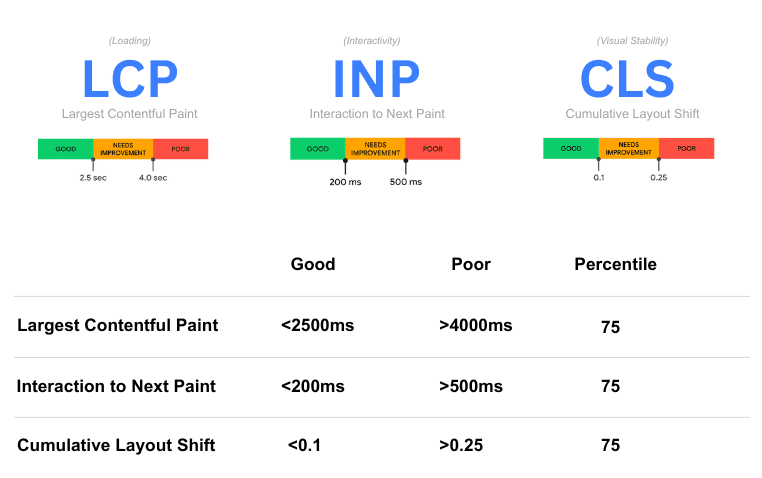
Core Web Vitals are a set of specific factors that Google considers essential for delivering a great user experience. These metrics measure key aspects of how users interact with a webpage, focusing on performance, responsiveness, and visual stability. The three Core Web Vitals include:
- Largest Contentful Paint (LCP): Measures loading performance, indicating how long it takes for the largest visible content on the page to fully load. A good LCP score is 2.5 seconds or faster.
- Cumulative Layout Shift (CLS): Tracks visual stability by measuring unexpected shifts in page content as it loads. A good CLS score is less than 0.1.
- Interaction to Next Paint (INP): Replaces First Input Delay (FID) as of March 2024. It measures the time from user interaction to the browser’s next paint, providing a more holistic view of page responsiveness. A good INP score is under 200 milliseconds.
Together, these metrics aim to quantify the user experience and are a crucial part of Google’s Page Experience update, which impacts search rankings.
Why Are Core Web Vitals Important?
Core Web Vitals are essential because they directly affect the usability and overall user experience of a website. Websites that meet the recommended thresholds for these metrics are more likely to rank higher on Google, as search engines prioritize user satisfaction.
- Conversions and Retention: A smoother, faster, and more stable site encourages users to stay longer, browse more, and convert into customers.
- User Experience: Slow-loading pages or unstable layouts frustrate users, leading to higher bounce rates and lower engagement.
- SEO Rankings: Core Web Vitals are a ranking factor, meaning poor scores can negatively impact your website’s visibility in search results.
How to Analyze Core Web Vitals
To optimize Core Web Vitals, the first step is understanding how to evaluate your site’s performance using reliable tools. Here’s how you can analyze Core Web Vitals:
1. Use Google Zoekresultaten
Google Search Console provides a dedicated Core Web Vitals report, which highlights performance issues for your URLs on both mobile and desktop devices.
- What It Does: Categorizes URLs as “Good,” “Needs Improvement,” or “Poor” based on thresholds for LCP, CLS, and INP.
- How to Use It: Identify underperforming pages and prioritize them for improvement.
2. PageSpeed Insights
This tool gives detailed insights into each Core Web Vital and suggests improvements.
- Real-World Data: Provides metrics based on real user data (Field Data) from the Chrome User Experience Report (CrUX).
- Lab Data: Simulates a user’s experience to highlight potential bottlenecks.
3. Lighthouse
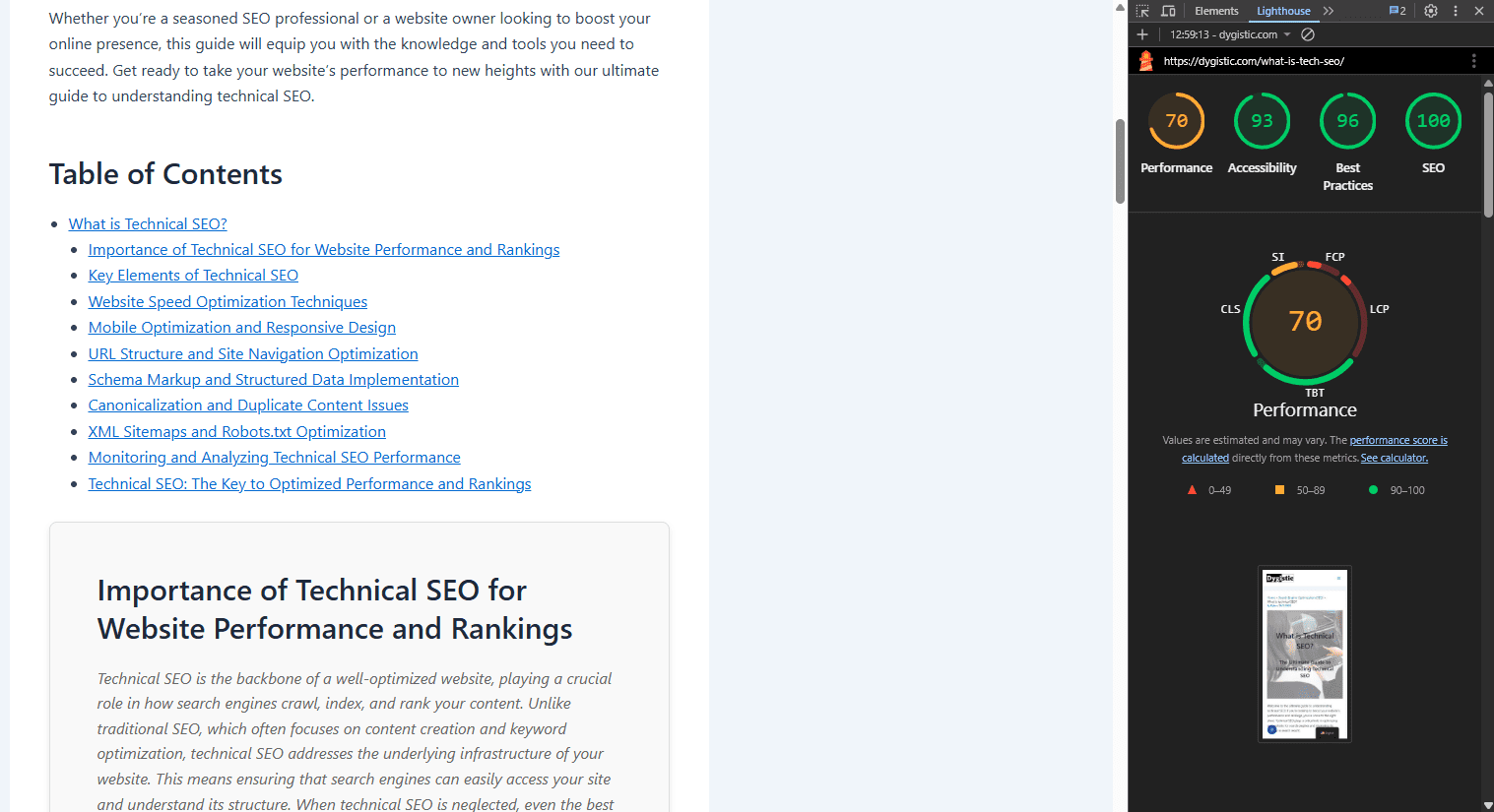
Available as part of Chrome DevTools, Lighthouse is an open-source tool that audits web performance and generates a detailed report.
Benefits: Offers actionable suggestions for improving LCP, CLS, and INP.
4. Other Tools for Monitoring
- WebPageTest: Detailed diagnostics, including render times and layout shifts.
- GTmetrix: Performance grades and improvement tips tailored to Core Web Vitals.
How to Improve Core Web Vitals
Once you’ve identified areas for improvement, here’s how you can enhance each Core Web Vital:
1. Improving Largest Contentful Paint (LCP)
- Afbeeldingen optimaliseren: Use modern formats like WebP or AVIF to reduce file sizes.
- Render-belemmerende bronnen minimaliseren: Defer or remove non-critical JavaScript and CSS.
- Use a Content Delivery Network (CDN): Deliver content faster by leveraging geographically distributed servers.
- Server Optimization: Reduce server response times by upgrading hosting or implementing caching mechanisms.
2. Reducing Cumulative Layout Shift (CLS)
- Set Size Attributes for Images and Videos: Define width and height in CSS or HTML to reserve space.
- Avoid Late-Loading Elements: Avoid injecting dynamic content or ads above the fold without pre-allocated space.
- Use Stable Fonts: Utilize font-display: swap to prevent layout shifts during font loading.
3. Optimizing Interaction to Next Paint (INP)
- Minimize JavaScript Blocking: Break long tasks into smaller chunks to avoid delays.
- Optimize Event Handlers: Simplify and reduce the execution time of interactive event handlers.
- Provide Immediate Feedback: Use visual indicators, like button states, to assure users their input is being processed.
Conclusion
Core Web Vitals are essential for ensuring a website provides a seamless and enjoyable user experience. By focusing on the three key metrics—Largest Contentful Paint (LCP), Cumulatieve verschuiving in lay-out (CLS), and Interaction to Next Paint (INP)—you can improve user satisfaction and boost search rankings.
These metrics influence:
- SEO Performance: As a confirmed ranking factor, Core Web Vitals directly impact your position on search engine results pages (SERPs).
- User Engagement: Faster load times, reduced layout shifts, and responsive pages retain users and improve conversion rates.
To fully optimize your website, analyze your current Core Web Vitals using tools like Google Search Console and PageSpeed Insights. Implement the recommended improvements, and monitor progress to ensure a consistent experience for your users.
Frequently asked questions about the Core Web Vitals
What are Core Web Vitals?
Core Web Vitals are user-centric performance metrics (LCP, CLS, INP) introduced by Google to measure a website’s loading speed, responsiveness, and visual stability.
Why are Core Web Vitals important for SEO?
Core Web Vitals are a confirmed ranking factor and directly influence search engine rankings. Pages that perform well in Core Web Vitals tend to rank higher and retain users.
How many types of Core Web Vitals are there?
There are currently three Core Web Vitals: Largest Contentful Paint (LCP), Cumulative Layout Shift (CLS), and Interaction to Next Paint (INP).
What does “Core Web Vitals Assessment Failed” mean?
It means one or more pages on your site did not meet Google’s recommended thresholds for Core Web Vitals.
How to improve Core Web Vitals?
To improve the core web vitals ensure that you do the following:
1. Optimize images and fonts for LCP.
2. Prevent layout shifts for CLS.
3. Minimize JavaScript blocking for INP.
Where to check Core Web Vitals?
You can check Core Web Vitals in tools like Google Search Console, PageSpeed Insights, Lighthouse, and WebPageTest.
When were Core Web Vitals introduced?
Google introduced Core Web Vitals in May 2020 as part of its Page Experience Update.
What is the next Core Web Vital?
As of March 2024, Interaction to Next Paint (INP) replaced First Input Delay (FID) as the responsiveness metric in Core Web Vitals.
What is Core Web Vitals in HTML?
Core Web Vitals are not specific to HTML but are measured based on how your webpage performs for users, including HTML content like images and interactive elements.
Are Core Web Vitals a ranking factor?
Yes, they are an official ranking factor in Google’s search algorithm.
Why Core Web Vitals?
Google focuses on Core Web Vitals to improve the overall quality of web experiences, ensuring users can access fast, responsive, and visually stable websites.
How do Core Web Vitals affect SEO?
Core Web Vitals directly influence rankings, user engagement, and conversion rates by creating better user experiences.